

Preparation
1. Before testing the SF6 gas density relay, if using the small gas cylinder provided with the instrument for gas supply, first check whether the small cylinder has enough gas, and the pressure inside the cylinder should be at least 1MPa.
Method to check the pressure of the small cylinder: tighten the "gas filling port", close the "pressure reducing valve" of the small cylinder, slowly open the "main valve" of the small cylinder, and the "pressure gauge" will display the gas pressure inside the small cylinder; if the pressure is less than 1MPa, charge it before testing the density relay.
Method to charge the small cylinder: first tighten the "main valve" and "pressure reducing valve", then unscrew the nut of the "gas filling port", use the charging rod (see Appendix Figure ○15) to connect one end to the small cylinder and the other end to the gas source cylinder interface, then slowly open the "main valve" of the small cylinder, then slowly open the valve of the gas source cylinder, at this time the small cylinder can be slowly charged, and the "pressure gauge" on the small cylinder displays the gas pressure inside the small cylinder in real time. After charging, the pressure of the small cylinder must be at least greater than 1MPa before testing.

When testing the SF6 gas density relay on site, disconnect the control power supply connected to the density relay to avoid damaging the calibrator during calibration.
2. Use the provided six-core signal test line, connect one end of the alligator clips to the alarm wire and lockout wire signal sockets of the density relay respectively (red alligator clip connects to the alarm contact, green alligator clip connects to lockout contact ①, yellow alligator clip connects to lockout contact ②, and the three black alligator clips can be arbitrarily connected to the other end of each contact. When performing single-action signal detection, unused alligator clips can be left idle, but do not short-circuit them with other alligator clips.).
3. Connect the other end of the signal test line to the six-core aviation plug signal port on the instrument panel.
4. Use the provided gas inlet tube to connect the "gas outlet" of the small cylinder to the "gas inlet" on the instrument panel.
5. Use the provided measurement gas tube, connect one end to the common connector (see Appendix Figure ○16), connect the common connector to the corresponding adapter (see Appendix Figures ①~○14) of the density relay to be tested, and connect the adapter to the density relay under test; connect the other end of the measurement gas tube to the "relay interface" on the instrument panel. (When calibrating a pressure gauge, connect the pressure gauge to be calibrated through the test gas tube to the "relay interface" on the instrument panel. During pressure gauge calibration, there is no need to connect the measurement signal line, otherwise it will interfere with the instrument; if you need to perform system pressure value correction, connect a high-precision pressure gauge that has been metrologically calibrated to the "relay interface" on the instrument panel.)
6. Connect the vent tube to the vent port on the instrument panel. If not connected, testing is prohibited.
7. Connect the instrument to AC220V power and turn on the power switch.
8. Slowly open the "main valve" on the small cylinder, then slowly open the "pressure reducing valve" on the small cylinder, observe the pressure value on the instrument panel pressure gauge (the pressure gauge value is the inlet pressure), it should be less than 1MPa, and greater than the alarm pressure value of the density relay under test or the target pressure value of the pressure gauge under test by 0.2MPa~0.3MPa.
9. The SF6 density relay calibrator system displays the main interface after startup as shown in Figure 1:
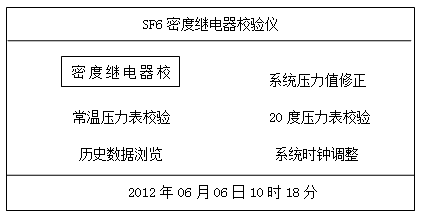
Figure 1
SF6 density relay calibrator density relay calibration method
1. Use the rotary mouse on the panel to move the cursor among functional menus. On the initial interface, select "Density Relay Calibration", press the rotary mouse, and the system displays the next-level interface as shown in Figure 2:
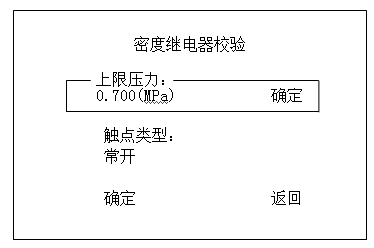
This interface is the setting interface for density relay detection parameters. The above parameters are the factory default values of the instrument.
"Upper limit pressure": Set to 0.1-0.2MPa higher than the alarm pressure value of the density relay.
"Contact type": Measure whether the contact type of the density relay is normally open or normally closed under no gas pressure, and select "Contact type" consistent with the density relay.
Rotate the mouse to select the "OK" key at the bottom row, and the system enters the next-level setting interface.
2. The setting menu for detection times, temperature acquisition, and signal type is shown in Figure 3
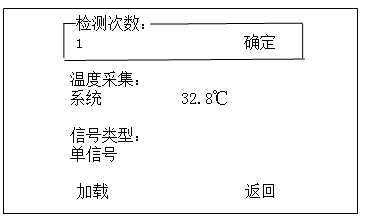
"Detection times": Set the number of charge/discharge cycles from 1 to 3, automatically charge and discharge and record the test results.
"Temperature acquisition": There are two acquisition modes: "System" and "Input". The default is "System", which is the temperature measured by the instrument's built-in temperature sensor; when the user has a thermometer, you can select "Input" to adjust the temperature coefficient. This temperature generally does not need to be set.
"Signal type": Use the rotary mouse to cycle the options among "Single Signal", "Single Lockout", and "Double Lockout".
"Single signal": Refers to single alarm or single lockout, can measure one set of signal values.
"Single lockout": Refers to single lockout signal, can measure one set of lockout signal values.
"Double lockout": Refers to double lockout signals, can measure two sets of lockout signal values.
After setting, select "OK" to enter the next-level interface.
3. The system enters the detection interface as shown in Figure 4:

In this interface, the system automatically performs charging and discharging operations. During the charging process, the pressure value gradually increases; when the pressure reaches the upper limit, the system automatically stops charging and starts discharging. During the discharging process, the pressure value gradually decreases. When the density relay acts, the system automatically records the action pressure value and displays it on the interface. After completing the set number of detections, the system automatically calculates the average value and displays the test results.
4. After the test is completed, the system displays the test results as shown in Figure 5:

The test results include the alarm pressure value, lockout pressure value, and the corresponding temperature values. The user can record these values or print them via the printer.
5. After the test, turn off the power switch, close the "pressure reducing valve" and "main valve" of the small cylinder, disconnect the gas tube and signal line, and put the instrument away.
Note: During the test, if the pressure value exceeds the upper limit, the system will automatically stop charging and alarm. At this time, check whether the gas path is blocked or the upper limit pressure setting is too low.
The above is the usage method of the SF6 density relay calibrator. Please read the manual carefully before use and operate strictly according to the steps to ensure accurate test results.
