How to use the transformer tester to perform CT test? The transformer tester is mainly used for CT, PT, volt-ampere characteristic and other tests. It has many characteristics such as fast test speed, high accuracy, convenient and flexible use, and has always been welcomed by the majority of electric power engineers. Especially CT test is a test that the transformer tester often needs to perform. This article takes YTC8750Evariable frequency transformer tester as an example to briefly explain how to use the transformer tester to perform CT test.
After entering the main interface, select the CT Test option, and a submenu appears: Parameter Setting , Secondary DC Resistance , CT Volt-Ampere , CT Ratio , Secondary Load , five function menus.
Parameter Setting
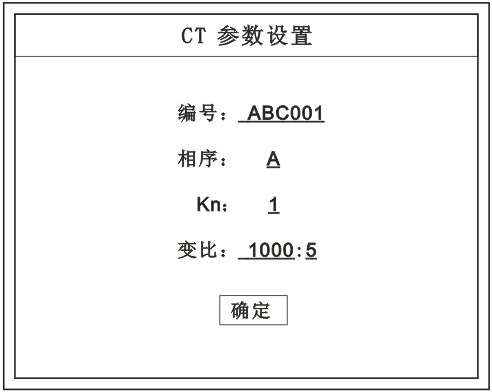
Parameter Setting interface (as shown below). Note:
When storing, the content of parameter setting will be used as the storage header.
When printing, the content of parameter setting will be used as the print header.
Note:
Please set the basic CT parameters before the test.
If the rated ratio secondary setting is incorrect, the ratio will be wrong.
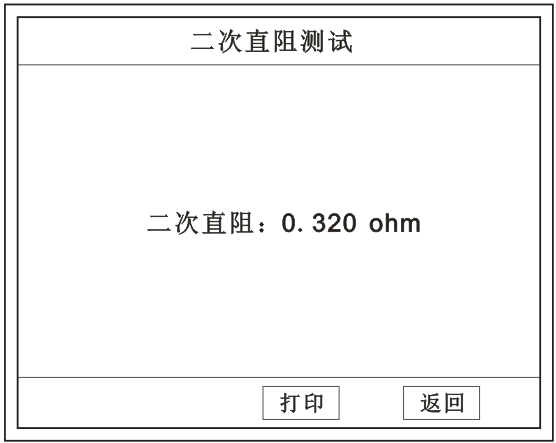
After connecting the test leads, select the CT Test option on the main menu interface,
press and rotate the mouse to select Secondary DC Resistance to enter the secondary DC resistance testinterface.
Note:
During the test, it will display: “Testing, please wait…”
CT Volt-Ampere Test
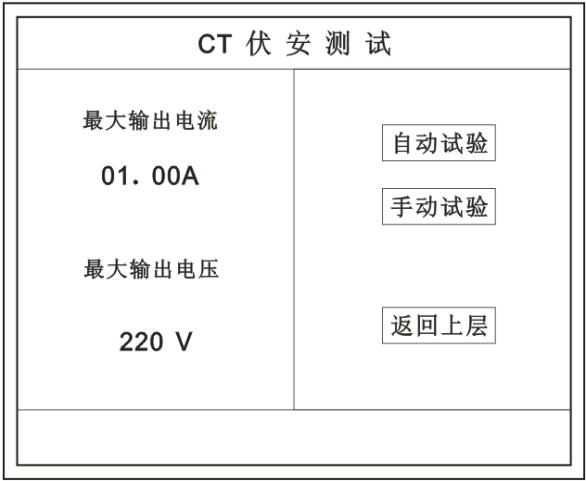
On the main menu interface, rotate the mouse to move the cursor to the CT Test option, press and rotate the mouse to select CT Volt-Ampere to enter the volt-ampere characteristic test setting interface (as shown on the right). Move the cursor to Return to Upper Level , and press the mouse to return to the main menu.
Interface Description
Maximum Output Current: The maximum current to be output, range (0 - 20) A.
Maximum Output Voltage: The maximum voltage to be output, ranges 30V, 110V, 220V, 600V, 1000V; click to select.
Automatic Test: Automatically take points to draw the curve, press this key to confirm and start the test.
Manual Test: Manually take points to draw the curve, press this key to confirm and start the test.
Test Method
Take out the (red, black) secondary wires from the wire bag, insert one end into the secondary side of the CT, and the other end into the volt-ampere characteristic output port of the instrument.