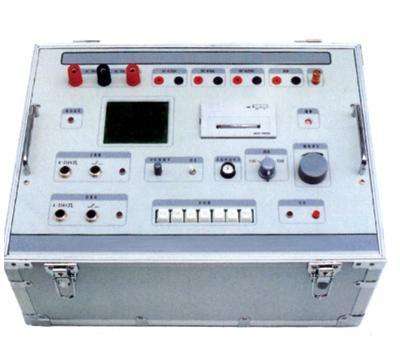
About the operating method of the GH-6208E dielectric loss tester:
1. Preparation before measurement:
1) Connect one end of the grounding wire to the grounding terminal of the instrument, and the other end to a reliable earth ground, ensuring that the instrument housing is at ground potential.
2) For normal wiring: Insert the high-voltage cable plug into the HV socket on the rear door, clamp the red large clip at the other end onto the high-voltage lead of the test object, and leave the black small clip hanging or clamp it onto the red large clip. Insert the CX low-voltage cable into the CX socket, connect the red clip at the other end to the low-voltage terminal of the test object, and leave the black clip hanging or connect it to the shielding device.
3) For reverse wiring: Insert the high-voltage cable plug into the HV socket on the rear door, clamp the red large clip at the other end onto the high-voltage lead of the test object, and leave the red small clip hanging or connect it to the shielding device. The Cx socket is not used.
2. Turn on the power switch, the instrument performs self-check. If the self-check is good, the LCD screen displays the Chinese main menu as shown in Figure 10.
3. Menu selection:
1) Press the key to move the cursor to each menu item, cycling through them. The selected item is displayed in reverse video. The flow of the selection key is shown in Figure 11.
2) With the cursor on the current item, press the ▼ ▲ keys to change the menu item, cycling through them. The flow is shown in Figure 12.
3) After changing the menu to correspond to the test requirements, press the selection key to choose the next item.
4. Frequency: With the cursor on frequency, press the ↑↓ keys to select fixed frequency or variable frequency:
With the cursor on fixed frequency: Press and hold the "Start/Stop" key for more than 1 second to switch to full frequency selection, then press the ↑↓ keys to cycle through 45Hz / 47.5Hz / 50Hz / 52.5Hz / 55Hz / 60Hz / 65Hz
Power frequency 50Hz measurement: This setting cannot resist interference. Select 50Hz for measurement or calibration in the laboratory. "45/47.5/55/52.5/60/65Hz": Single frequency measurement, selected when studying the change of dielectric loss at different frequencies.
With the cursor on variable frequency: Press and hold the "Start/Stop" key for more than 1 second to switch to full frequency selection, then press the ↑↓ keys to cycle through 5-Hz / 6-Hz / 4-Hz":
"5-Hz": Automatic frequency conversion at 45/55Hz, suitable for measurement under 50Hz power grid interference.
"6-Hz": Automatic frequency conversion at 55/65Hz, suitable for measurement under 60Hz power grid interference.
"4-Hz": Automatic frequency conversion at 47.5/52.5Hz, suitable for measurement under 50Hz power grid interference.
5. Test: When the cursor is on the Test item, press the confirm key for about 3 seconds to start the test. During the test, the display is as shown in Figure 13 (normal wiring, variable frequency). When the progress reaches 100%, the test is completed, and then the measurement results are displayed as shown in Figure 14. At this time, the cursor indicates the printer icon; press the confirm key to print the report. The meaning of the measurement results is as follows:
tgδ: The dissipation factor tgδ value of the test object
CX: Measured capacitance value
V: Applied voltage value
I: Current flowing through the test object
F1,F2 : Test frequency